The modern display in your vehicle now does more than show speed. It brings vehicle data, cloud-driven insights, and infotainment into one driver-focused view. This guide will show practical setup paths—factory, OBD-II, or aftermarket—and how to use features safely while driving.
Why this matters now: more sensors, more software, and broader connectivity turn the car into a rolling data hub. Internet- and cloud-enabled models can send roughly 20–200 MB of data per day, enabling real-time services and updates.
Expect faster access to key info, easier navigation, remote services, and clearer safety alerts. These systems blend vehicle controls with digital services for a unified experience without adding clutter.
Later sections will cover planning, privacy trade-offs, platform limits, and practical tips to balance capability and security. For a deeper technical view, see a detailed primer on smart clusters and cloud integration at smart dashboards and connected vehicle experiences.
What a Smart Digital Dashboard Really Does for Drivers Today
High-density displays have replaced rows of analog dials with flexible, context-aware readouts.
From analog gauges to high-density digital displays
Digital gauges can show more precise readings than analog needles. They cycle through data sets with a button press. This replaces many physical dials while keeping key metrics readable at a glance.
Why modern dashboards prioritize fast access to information
Quick access reduces distraction. Modern systems surface speed, warnings, and navigation prompts first. Fewer menus mean drivers find tire pressure, engine temps, and alerts in seconds.
Examples of how OEMs raise the bar for usability
Manufacturers blend clarity with mode-aware design so the interface adapts to intent. Tesla set a high information standard by combining vehicle status and a large map. Ferrari and Lexus tune clarity and drive-mode changes, while Genesis uses a 3D cluster to add depth without losing readability.
| Model | Key feature | User benefit |
|---|---|---|
| Tesla Model S (2020) | High-info cluster + large navigation | One-view status and routing |
| Ferrari 488 Pista Spyder (2020) | High-visibility cluster | Rapid glance readability |
| Genesis G70 (2020) | 12.3-inch 3D cluster | Tech-forward clarity |
| McLaren 720S (2020) | Cluster folds to HUD | Minimal distraction in sport mode |
| Lexus LC500 (2020) | Cluster adapts with drive modes | Context-aware information |
How Connected Car Technology Powers Real-Time Data on Your Display
Modern vehicle displays turn streams of sensor signals into useful prompts while you drive.
Plain definition: a connected car has internet connectivity—either embedded or tethered—that lets the vehicle exchange data with services and devices. This link enables remote features, alerts, and live info on-screen.
Telematics basics
Sensors and ECUs supply raw telemetry over the vehicle CAN bus. Edge devices apply rules, triggers, and geofencing so the output becomes usable driving data like health, efficiency, and diagnostics.
Vehicle-to-cloud flow
Telemetry moves from the car to a cellular or V2X link (LTE/5G, DSRC) and into a cloud platform. The cloud normalizes signals and returns insights so the display shows alerts, not just numbers.
Modes and real-time limits
V2V and V2I links share position, speed, and signal info to improve safety and reduce traffic friction. Some metrics update instantly; others need cloud processing and may lag with poor connectivity.
Embedded vs tethered
Embedded systems have built-in chipsets and always-on capabilities. Tethered setups rely on your phone for connectivity and depend on battery life and permissions.
Planning Your connected car dashboard Setup: What to Check Before You Start
Plan your setup by listing installed systems and noting whether the modem is built in or phone-tethered.
Pre-setup checklist: confirm model year, trim, factory infotainment, OEM app support, and any built-in modem. Verify which vehicle systems the OEM exposes and whether an OEM cloud subscription is required for remote features.
Compatibility and platform limits
Platform and system architecture decide what data you can read and what actions you can take. Some vehicles expose many PIDs; others only offer basic telemetry. Ask the vendor which modules and devices are supported before you buy.
Three upgrade routes
- Factory upgrades: Best for full integration if your vehicle supports OEM services.
- OBD-II add-ons: Quick install for diagnostics and simple alerts via an edge device.
- Aftermarket clusters: Full replacement for older cars that need a modern display and extra capabilities.
Connectivity and realistic access
In the US you can use embedded cellular subscriptions, Wi‑Fi hotspot features, or phone tethering. Cellular links (LTE/5G) plus cloud services power the richest alerts. Remember: not all platforms allow remote control—some require OEM cloud access.
Buying sanity check: match promised capabilities to your car’s platform and avoid paying for services the vehicle can’t support.
Setting Up a Factory Connected Dashboard and Infotainment System
Start with updates and clean pairing to unlock a safer, simpler in-vehicle experience.
Quick setup steps: update the head unit software if prompted. Then pair devices via USB, Bluetooth, or Wi‑Fi depending on the model. Follow onscreen prompts to allow permissions for microphone and notifications.
Pairing for Apple CarPlay and Android Auto
Systems like Apple CarPlay and Android Auto project phone apps onto the in-dash screen. This changes the infotainment experience by offering simpler controls for navigation, music, and calls.
Safe use of navigation, voice, and messaging
Configure favorites and allow voice permissions so you can use speech to get directions or send messages hands-free. Rely on voice control for calls and text replies while driving to reduce distraction.
Turning on Wi‑Fi hotspots and remote features
Enable hotspots and remote services only after confirming subscription status. Set a strong password and review what data the service uses. Many factory features include real-time traffic overlays, remote lock/start on supported models, and OTA updates for software improvements.
- Mini-checklist for less distraction: enable Do Not Disturb While Driving, disable banner previews, and limit on-screen apps to audio and navigation.
Installing an Aftermarket Digital Gauge Cluster or Smart HUD Display
Upgrade installs need planning, safety gear, and clear labeling to avoid surprises.
Start with safety: disconnect the battery, gather basic tools, and review your repair manual. Work in daylight or bright shop light for clear visibility.
Remove the original cluster by locating screws beneath the dash, gently pulling the unit, and disconnecting connectors. Label each wire before you cut or reroute it.
Mounting, sensors, and control module placement
Seat the new gauges and secure mounting points per the kit. Connect ribbon cables and the control module using the supplied network cable (often CAT‑5).
Install sensors where they belong: water temperature near the thermostat housing, oil pressure at the rear of the engine block. Route sensor leads away from heat and moving parts.
Mount the control module in a dry, cool spot—behind the glove box or on the cabin side of the firewall to avoid heat and moisture.
Wiring essentials and visibility checks
Wire power, ground, ignition-switched power, and signal leads. Verify with a multimeter and add appropriate fuses. Test day/night readability and adjust to reduce glare and internal reflections.
“Always consult the owner’s manual or a repair guide for your specific vehicle—these steps are general and not vehicle-specific.”
| Step | Location | Why it matters |
|---|---|---|
| Cluster removal | Under dash screws | Prevents broken tabs and unidentified wires |
| Sensor fit | Thermostat / engine block | Accurate temp and pressure readings |
| Module mount | Glove box / cabin firewall | Protects from heat and moisture |
Using Dashboard Features That Improve Safety and the Driving Experience
Today’s systems turn live sensor feeds into concise prompts that help drivers decide faster.
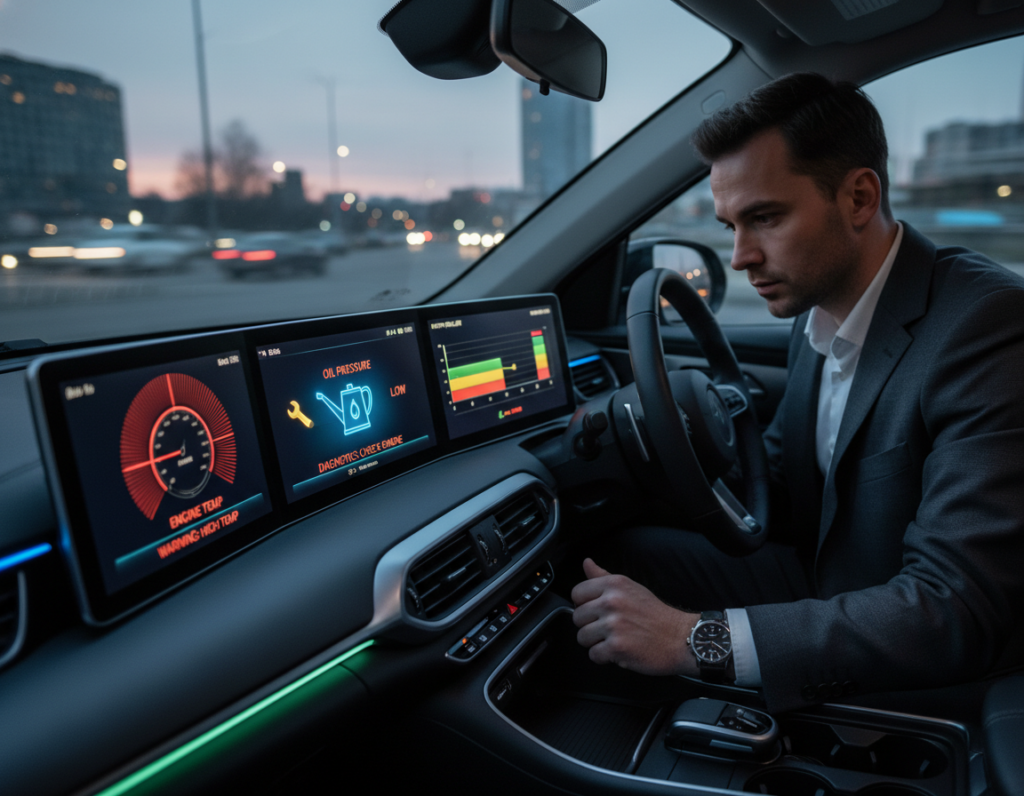
Prioritize alerts so they help, not distract. Keep engine health, tire pressure, and temperature warnings at the top. Silence non-urgent notices during travel so the driver sees only critical items.
Real-time alerts that matter
Practical alerts include sudden coolant temperature rises, low fuel warnings, tire pressure drops, and diagnostic flags. These prompts let drivers act early and avoid breakdowns.
Navigation and traffic tools
Enable live traffic layers and incident reroutes to cut time on the road. Arrival-time predictions and dynamic routing lower congestion and improve fuel use.
V2V and V2I awareness
Vehicles and infrastructure can share speed, position, and signal timing. That exchange warns of hazards ahead and smooths intersections, making roads safer. Coverage varies, so treat these as assistive features.
- Safe setup checklist: keep map zoom readable, limit on-screen widgets, prefer voice prompts, and prioritize critical alerts.
| Feature | What it alerts | Driver benefit |
|---|---|---|
| Engine & diagnostics | Overheat, fault codes | Early repair, fewer breakdowns |
| Tire monitoring | Pressure drops, slow leaks | Better traction, fewer flats |
| Live traffic | Incidents, congestion | Shorter trips, improved fuel economy |
Getting More Value From Connectivity: Maintenance, Updates, Parking, and Routing
Cloud analytics turn routine sensor readings into clear maintenance signals and smarter route choices.
Over-the-air software updates let manufacturers fix bugs and patch vulnerabilities without a dealer visit. Check update settings, allow downloads on Wi‑Fi, and schedule installs while the vehicle is parked to avoid interruption.
Predictive maintenance uses sensor data sent to the cloud to forecast failures. Watch for battery health trends, rising misfire counts, abnormal temperature spikes, or repeated sensor anomalies. Early alerts help you plan service and cut unexpected repairs.
Smarter parking and routing
US drivers spend about 17 hours a year looking for parking, costing roughly $73B in time, fuel, and emissions. Use location-aware apps and platform services to find availability and reserve spots when possible.
Traffic prediction and intelligent routing combine IoT sensors and aggregated data to reduce stop-and-go driving. That improves fuel use, lowers emissions, and shortens travel time. As autonomous systems and more data sources join platforms, route accuracy will only get better.
“Less circling for parking and smarter routes add up — you save time, cut fuel use, and reduce stress.”
| Feature | How to manage | Driver benefit |
|---|---|---|
| OTA updates | Enable auto-download on Wi‑Fi; schedule installs | Fewer dealer visits; faster fixes |
| Predictive maintenance | Monitor battery, misfires, temp patterns | Planned repairs; lower repair costs |
| Smart parking | Use location apps and spot reservations | Save time; cut fuel and emissions |
| Traffic prediction | Enable live routing and traffic layers | Shorter trips; reduced stop-and-go |
For a deeper technical look at how analytics and cloud platforms drive these gains, see this primer on automotive analytics.
Protecting Data, Privacy, and Access in Connected Vehicle Systems
Every trip can generate tens to hundreds of megabytes of telemetry that flows to remote services.
What these systems collect each day
Typical exports include location history, vehicle diagnostics, usage patterns, infotainment interactions, and other telemetry sent over cloud links.
Why it matters: this information improves safety and uptime but can raise privacy risk if accounts or apps are poorly managed.
Reducing risk: app security and account protection
Take these practical steps to limit exposure:
- Use strong, unique passwords and enable two-factor authentication where offered.
- Review app permissions and remove stale devices and accounts.
- Limit remote access to the minimum features you need for convenience and safety.
OTA patches, control, and industry response
Manufacturers can deploy software patches across fleets quickly, sometimes in days or minutes, to close security holes.
Know who controls your information: OEMs, app providers, and platform partners all may touch the pipeline. Ask your provider about retention, sharing, and opt-out options.
Privacy expectations and the US regulatory landscape
The CCPA has influenced national privacy norms and the automotive industry is moving toward clearer consent and transparency.
“Balance convenience with the least required access to fit your comfort level.”
For a deeper technical look at data practices and consumer privacy, read this data privacy primer.
Conclusion
Instrument clusters have shifted from static gauges to flexible systems that improve over time. ,
Key takeaway: a modern vehicle blends sensors, infotainment, and cloud services so the car becomes an updateable product, not just hardware.
Act now: optimize factory infotainment for voice and alerts or plan an aftermarket HUD based on vehicle compatibility. Each path gives clearer information, better navigation, smarter traffic handling, and timely safety alerts that improve your road experience.
Long-term value comes from OTA updates and evolving platforms that add features without replacing hardware. Still, manage privacy, permissions, and account security to keep data safe.
Next step: pick one improvement this week—pair audio and navigation, enable key alerts, or review connected-car privacy settings.